
To allow automatic arrival of objects, generators of objects are used.
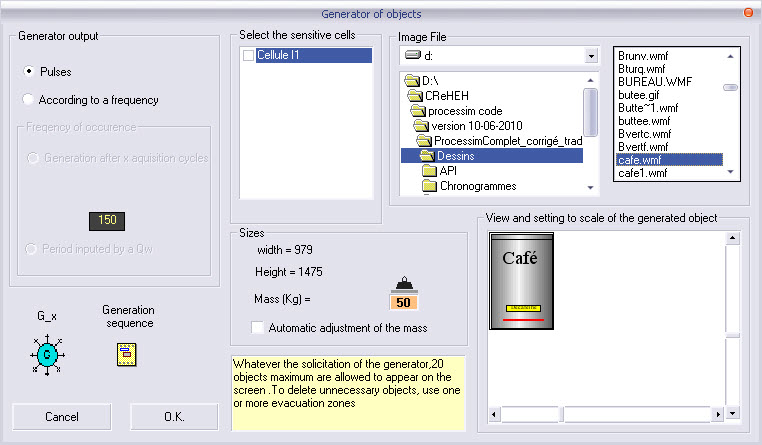
Those objects are to be fetched from the toolbox and set in place by using the following window :
The generators of objects are available into the toolbox
This functionnality require an additional programming to simulate the modification of appearance realised by your proces Combinated programming
Choose the image file, and parameterize the object :
its sizes ;
its sensitive photoelectric sensors ;
its name ;
its weight (default value : 50 Kg)
if the checkbox "Automatic adjustment of the mass" is checked, the weight is adjusted depending the new sizes (image substitution, resize) ;
"Conveyor safety stop", the image object is used as stop on the conveyors (only horizontal or vertical view).
The dialog box enables you to choose three methods of generation of objects :
pulse (from the rising edge from the control relay signal) ;
periodic, at a given frequency (Generation at each X acquisition cycles, X value set with the potentiometer) ;
periodic, at variable frequency (Generation at each X acquisition cycles , x value set using a command word).
See also : Analog inputs
Important remarks :
A large number of bytes for an image object diminishes the resources and the performance of your PC.
The vectorial files (Emf and Wmf) allow to scale without loss of quality
The directory by default is ‘Drawing’, which is located in the ProcesSim installation directory
Do not forget to provide these files with your application.
You can create up to 60 objects on the screen.